sábado, 7 de maio de 2011

Paper Smartphone using Android?

Paper Smartphone using Android?: "

One of the cool gadgets shown in the SyFy series Caprica was an interactive piece of paper that would send email, surf the web, and do just about anything else a computer can do. Then the character could fold it up and place it in their pocket or purse. Genius. Too bad we couldn’t do that now. Oh wait, WE CAN. Check out this smartphone made completely of paper and plastic.


“This is the future. Everything is going to look and feel like this within five years,” said Roel Vertegaal, director of Queen’s University Human Media Lab in Ontario, Canada.


Created by university researchers at the Queen’s University Human Media Lab in Ontario, Canada, the paper smartphone uses eInk and a printed circuitry embedded into a flexible display. Judging from the menus shown in the video below, it looks like it may use a version of Android as its OS with a conceptual overlay. The Paperphone employs a technique called “bend gestures” to navigate and select an action. The smartphone can make phone calls, play music, navigate through contacts, and even send text messages. And to enter data, users write on it like conventional paper with handwriting recognition to translate it into a digital entry.


But the most amazing thing about the Paperphone, is that it uses no power when it isn’t being used or interacted with. The display is made out of very thin film what looks to be an advanced version of the same eInk technology used by the Amazon Kindle, which is very stingy on power consumption. With it’s flexible design, the phone will conform to a user’s pocket and larger designs will be able to transform computers, tablets, and anything that processes documents. And users can stack them almost like real paper with no need for office printers. Could this be the beginning of a truly paperless office?


paperphone1
article-1383903-0BEBBE3E00000578-729_634x520
circuitry

)"

How To Remove Ambient Noise From Your Audio Files Using Audacity

How To Remove Ambient Noise From Your Audio Files Using Audacity: "

how to remove background noise from audioIf you’re a little bit musical or you make your own podcasts, you’ve probably noticed that sometimes your recordings can sound a little annoying due to the background noise captured in the recording process. This white noise is not always easy to remove, but can be minimalised by the use of free tools and a little know-how.

Audacity is a free program available for Mac, Windows and Linux, so most people should be able to download this and use it to clean up their recordings. Today we’ll take you through a few simple steps you can use on all recordings to remove background noise from audio.

Install Audacity

When you’ve downloaded Audacity, you’ll notice that it’s able to be used to import or record music and vocal tracks and can be used to mix tracks together for other purposes. This makes it very useful to musicians and podcasters alike, whether you are an amateur or a professional. It’s very easy to isolate sections of each individual track and use the editing features to remove the ambient noise in the background.

Import Or Record Audio

Either import the audio file you wish to clean up, or use Audacity as the recording tool. In Mac you need to go to Project > Import Audio, whereas in Windows you’d use File > Import > Audio.

how to remove background noise from audio

Isolate A Quiet Moment

After importing, you’ll see the tracks of the audio file as separate lines in Audacity. This shows the waveform of the track. Flat sections are quiet while big vertical lines indicate the noisy sections.

noise removal help audacity

Zoom in until you can find a moment where there was no deliberate sound in the track (the flattest bit you can find), such as when you paused for a moment. Go to View > Zoom In. Then highlight the flat section by clicking and dragging with your mouse across that part of the track. Audacity suggests this selection shouldn’t be longer than a half a second.

noise removal help audacity

This will isolate a moment where all you recorded was the ambient background noise. By letting Audacity know precisely how much background noise there was, it can calculate how to remove it from the rest of the track.

Step 1 – Get Noise Profile

Once you’ve selected the quiet part of the track, go to select Effect > Noise Removal.

noise removal help audacity

This opens up a dialogue to remove the noise. You’re performing Step 1 here, so click on “Get Noise Profile” and the dialogue will disappear. You can do this again at any time and it will overwrite the previous selection. What happens next is a little confusing, as it has already acknowledged your quiet section of your audio track and simply shut the window on you.

how to remove background noise from audio

Step 2 – Apply Noise Reduction

Now Audacity needs to know which parts of the audio track you want to apply the noise reduction to. Most likely, you’ll want to apply the reduction to the whole project, so click CTRL-A or CMD-A to select all. If you want to select just a portion of the track or just one track, place your cursor at the start of your desired selection and go to Edit > Select > Cursor to End. Then, to remove ambient noise from the selection, go to Effect > Noise Removal again.

We’ve done step 1, so skip to step 2 now. Move the slider to indicate how aggressively you want Audacity to strip the background noise from your track. Many people tend towards the lower end, since stripping out too much sound can make voices sound quite tinny and weird. You can preview the sound or go straight to “Remove Noise“. If you don’t like it later, you can undo it. Make sure you listen to it before you go on to make more changes.

When you view your tracks, you should be able to see that the peaks are not quite as high, and the flat sections are far flatter now.

If you’re dealing with a special case, such as removing noise from cassette audio, take a look at the full Audacity wiki page on noise removal. There’s some great tips.

See also these great articles on Audacity:

Image Credit: ShutterStock


Do you like MakeUseOf articles? Don’t forget to share our articles with others! It’s really important to us.

More articles about: , , ,

Similar articles:


"

Java Posse #350 - Newscast for May 6th 2011

Java Posse #350 - Newscast for May 6th 2011: "

Newscast for May 6th 2011


Fully formatted shownotes can always be found at http://javaposse.com


Quick News


Android


ScalaWags


Adventures in Ruby


Random Crap


Listener Feedback


Thanks


The Java Posse consists of Tor Norbye, Carl Quinn, Joe Nuxoll and Dick Wall


"

Here’s 7 things Google should announce at Google I/O

Here’s 7 things Google should announce at Google I/O: "

With Google I/O 2011 right around the corner, it’s time to take a quick look at the things Google should announce at the developer conference. Our favorite OS is about to face some really fierce opposition from companies like Apple, Microsoft and Nokia.


All these three companies are doing everything in their power to erase Android from the face of the Earth — make no mistake, they despise Android at the molecular level. Especially Microsoft and Nokia, whose future depends on beating Android. If Windows Phone 7 fails to gain traction, Microsoft won’t be able to compete in the mobile arena ever again and Nokia will eventually have to adopt Android. With competitors going on the offense (mostly suing Android supporters), what should Google do to fend them off?


Ice Cream Sandwich


Android’s next dessert-based version will most likely make a debut at Google I/O next week. We know this version is codenamed Ice Cream Sandwich, but aside from that, there’s not much we know at this point — we don’t even know which version number it’ll be.


Based on a rumor we heard last month, in this version, Google plans to merge the code base of Gingerbread, Honeycomb and Google TV. If true, we could see some Honeycomb and Google TV features make their way to Android phones and vice versa. Due to the lack of detail we have about Ice Cream Sandwich, there’s a lot room for Google to surprise us — so make sure you have a defibrillator at arm distance next Tuesday, just in case.


Google Music and more


Ah Google Music, will you ever be released? Google Music was supposed to be released last year, then it was pushed to March of this year. March came and left and we didn’t see the mythical service released. The last we heard was that Google was still signing deals with record companies. We know Google Music will definitely be announced some time in this decade, but why stop there. Google should throw movies, TV shows, ringtones, and podcasts in there as well, and call it Android World — somebody at Google can probably come up with a better name.


This “Android World” service would sync all your pictures, videos, music, apps and books via the cloud, making my phone’s USB cable forever useless. Additionally, moving all your stuff to a new device would be as simple as logging in with your Google account. If Google wants to truly compete with iTunes, the company needs to go the whole way and think about all the different types of media we consume every day.


New and more secure Android Market


Google keeps improving the Android Market’s experience, but somehow I’m never satisfied. If Google wants to make the Market easier to use they don’t have to look far, they should just check Chomp. Since I found the Chomp app, I rarely use the Market app anymore. Why? It’s easier to find what you’re looking for, the app is fast and snappy, and it’s beautifully designed. The Market app falls short on all three categories. The Android Market has come a long way since its Android 1.5 humble beginnings, but now it’s time to work some of that Matias Duarte magic and overhaul the whole app.


We all know how the Android team feels about fragmentation, in that they keep saying there’s none. But don’t be surprised if they start to make changes that allows them to control Android’s “diversity”. One of those changes could be in the Market.


We’re at a point where Android is so popular, we’re seeing it everywhere, running on devices as different as the T-Mobile Comet and the Motorola Atrix 4G. As a result, very soon we could see Google start to customize the Android Market for different categories of Android phones. Low-end phones would only be able to download apps that are not very hardware-demanding. While high-end phones will be able to download graphic-intensive apps like Dungeon Defenders.


The Android Market you get, already depends on which phone you get. We’re seeing this type of app filtering with the recent ban of tethering apps from those phones available from T-Mobile, AT&T and Verizon. This is only taking it one step further.


Next up in the Android Market checklist is: security. I find it quite funny that we need antivirus software for our phones these days. While it’s interesting that phones are basically computers nowadays, we shouldn’t need extra protection like we need on PCs. The most effective way to spread a malicious piece of software on Android is through the Market. That’s where Google needs to build a giant wall, put some more wall on top of that wall and then put laser guns on top of that wall.


The whole “open vs. closed” argument goes outside the window the second you get infected with a rogue app. That person that just got its identity stolen using an Android phone doesn’t care one bit about Android’s openness, and probably wishes it had bought an iPhone. I’m not saying Google should manually approve every app that gets in the Market, but at least put them through some kind of process that checks for suspicious code and then manually check those apps that get flagged.


Themes


I’ve been talking about Android themes for a while now, but either Google doesn’t care about it or they’re taking their sweet time to release it. Basically, I wish Google allowed users to theme their phones just like carriers and manufacturers are able to. Don’t like Samsung’s TouchWiz UI? Download the “classic” Android theme from the Market and that’s it. Now your Galaxy S phone looks just like a Nexus S — simple as that.


This won’t be an easy task for the Android team though, since they’ll have to build some new and special APIs that allows developers to change how everything in Android looks — from the Notification bar to the check-boxes.


Official web-based Android IDE


Have you tried building an Android app lately? It’s not that easy. For the average Java developer or Eclipse guru it might be a rather painless experience, but for the rest of the world is a nightmare. It’s in Google best interest to make Android development as easy as possible.


That next great idea for mobile might not come from a developer but a doctor, and Google should do everything they can to make sure that the next big mobile app comes to Android first, and not iOS. How easy should Android development get? If you have to explain what an SDK is, it’s still too hard.


To make Android development as easy as using Photoshop, Google needs to start from scratch. First, they should build their own Android IDE as a web app. With nothing to install, nothing to update and no SDK to download. Just a web-based IDE for Android development, plain and simple.


Secondly, make app design a first-class citizen and not an afterthought. People should be thinking about how their app will look and behave, and not the intricacies of the Java language. Third, integrate with other tools like Flash and Photoshop. Make it possible for people to design their apps with other tools and just wire it up using the Android IDE.


Lastly, make app publishing and updating even easier than it is now. Publishing an app to the Android Market should be as easy as clicking a big “Publish” button right from the Android IDE. Want to see the Android Market explode with useful and beautiful apps, Google? Do this.


Gaming service


iOS has Game Center and Windows Phone 7 has Xbox Live. What does Android have? Nada. Google needs to get serious about gaming on Android as soon as possible. You know Microsoft is going to beat the Xbox drum for WP7 until the end of the world — and Android needs a good counterpart. The service needs to be social, easy and fun to use, and should make Android games even more addictive. Throw in achievement unlocking for good measure and you have a winner.


Naturally, the gaming service should also have an app built for Google TV. It doesn’t need to have any blockbuster video games at launch like the Xbox has, but if Google builds a good gaming platform that beautifully ties together your Android phone, tablet and TV, developers will eventually come. Who knows, maybe in a few years we’ll be playing Call of Duty on our Google TVs.


New Google Voice app


This is more of a personal request, and not something Google really needs to announce at Google I/O. I want to see Google finally release a Google Voice app with native VoIP support. Right now, the Google Voice app still uses your carrier’s voice network to connect calls — that shouldn’t happen.


We know Google has the capabilities for doing this because VoIP calling has been available for many months on Gmail. I can make calls with Google Voice on my computer but not on my Android phone. What gives, Google? It’s quite possible that the company doesn’t want to angry its newfound friends, the wireless carriers. Seeing as the future of Android still depends hugely on the amount of support that the carriers give the OS.


Free VoIP calling from Google would certainly make some people at AT&T, and Verizon a little uncomfortable. Still, VoIP calling on our phones is an oncoming train and no carrier will be able to stop it. Google should be the company that convinces carriers that they don’t own “calling” any more, by releasing Google Voice with VoIP.


Google I/O is only four days away and I expect Google to announce at least one of these products during the event. What do you guys/gals think? Anything else Google should announce at Google I/O? Let us know in the comments.


"

Synchronize Your Computer and Google Docs Account with SyncDocs

Synchronize Your Computer and Google Docs Account with SyncDocs: "

Are you looking for a quick and easy way to bridge the gap between the files stored on your computer and those in your Google Docs account? Then you need SyncDocs. SyncDocs synchronizes the files on your computer and those in your Google Docs account effortlessly for total file management bliss.


The installation process for SyncDocs is simple. Once the basic install is done you will begin the account setup and synchronization process. You will need to enter your account login credentials and agree to the terms of service.


Here is the information regarding how your account credentials are handled by SyncDocs.


Once you have entered your login credentials SyncDocs will conduct a quick account test.


Next up will be the Preferences Section asking where you want your sync folder to be located and the name you want it to have, file types to be synced, whether you want your documents to be converted to Google Docs format or not, and Windows integration features you can have enabled if desired.


Once you click the Finish Button SyncDocs will begin the synchronization process.


Note: SyncDocs will add a start up entry to your system for automatic synchronizing goodness every time you start your computer.


This is what the Context Menu for the System Tray Icon looks like.


Followed by the Google Docs sync folder on our system.


If you selected the option to have Google Docs as your default office suite, then double clicking your documents will open them in your default browser. To see more SyncDocs goodness be sure to watch the excellent demo video included below!


System Requirements: Works on Windows 7, Vista, and XP. Requires .Net Framework 3.5 or higher for regular installations and .Net Framework 3.0 for USB stick (portable) installations.


Note: At the moment SyncDocs is still in the beta testing phase. Later there will be free and paid versions of the app.


SyncDocs Homepage [via Lifehacker]


HTG Explains: Do Firefox Memory Cleaners Actually Work?How To Use Ember Media Manager to Organize Your Media CollectionHow to Protect Your Flash Drive Data with TrueCrypt


"

domingo, 1 de maio de 2011

Easily Speed Up Firefox by Changing Four Preferences

Easily Speed Up Firefox by Changing Four Preferences: "

Firefox is a very flexible and powerful web browser. It’s also open source, free, and speedy, most of the time. However, there may be times when it doesn’t seem as fast as it should be. This post will show you four preferences you can easily change to speed up Firefox. We also provide links to the MozillaZine Knowledge Base so you can read about each preference to learn more about its purpose.


We tried tweaking these preferences in Firefox 3 on an old, slow computer and noticed a significant change in how fast Firefox opened, how fast we could open a new tab, and how fast we could open a web page onto a new tab from a bookmark. The same preferences are available in Firefox 4, which is the version we used as an example in this post.


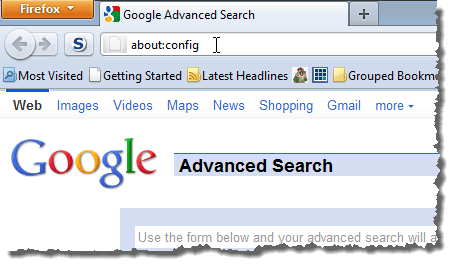
To change the preferences in Firefox, enter “about:config” (without the quotes) in the address bar and press Enter.


Entering about:config in the address bar


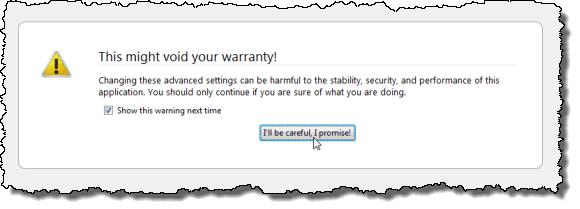
If you see the message telling you that what you are about to do might void your warranty, click the I’ll be careful, I promise! button to continue.


NOTE: If you don’t want to see this warning every time you access the Firefox preferences, select the Show this warning next time check box so there is no check mark in the box.


This might void your warranty! warning


Enter the following line in the Filter edit box.


network.http.pipelining


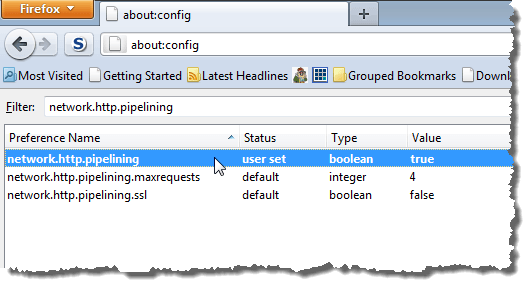
Double-click on the network.http.pipelining preference to change it’s value to true.


NOTE: Any preferences that have been changed from their default values are displayed in bold.


For more information about the network.http.pipelining preference, see Network.http.pipelining – MozillaZine Knowledge Base.


Changing network.http.pipelining to true


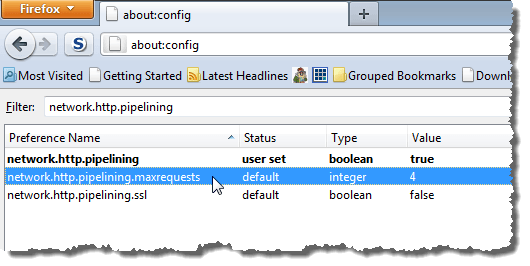
Another preference we want to change was found by entering the above filter value. Double-click on the network.http.pipelining.maxrequests preference.


Double-clicking on network.http.pipelining.maxrequests preference


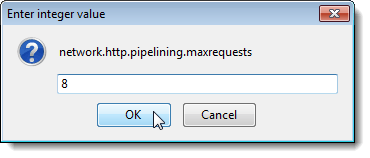
The Enter integer value dialog box displays. Change the default value of 4 to 8 in the edit box and click OK.


For more information about the network.http.pipelining.maxrequests preference, see Network.http.pipelining.maxrequests – MozillaZine Knowledge Base.


Changing network.http.pipelining.maxrequests preference to 8


Change the value in the Filter edit box box to the following line.


network.http.proxy.pipelining


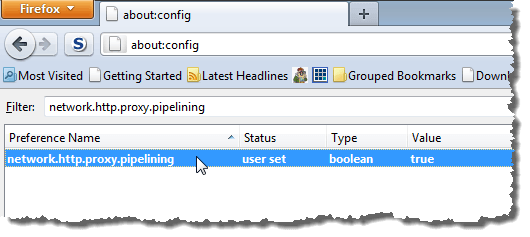
Double-click on the network.http.proxy.pipelining preference to change its value to true.


For more information about the network.http.proxy.pipelining preference, see Network.http.proxy.pipelining – MozillaZine Knowledge Base.


Changing network.http.proxy.pipelining preference to true


Change the value in the Filter edit box box to the following line.


network.dns.disableIPv6


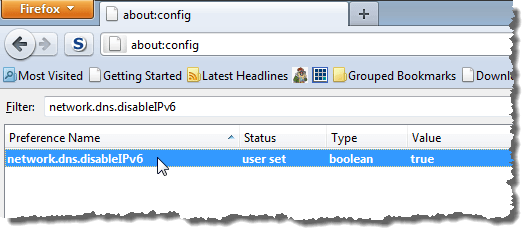
Double-click on the network.dns.disableIPv6 preference to change its value to true.


For more information about the network.dns.disableIPv6 preference, see Network.dns.disableIPv6 – MozillaZine Knowledge Base.


Changing network.dns.disableIPv6 preference to true


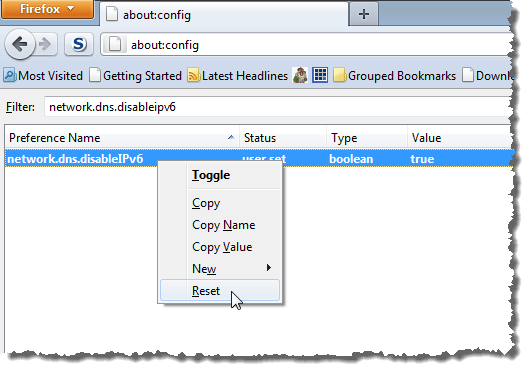
If you want to reset any of the preferences you changed, find the preference again, right-click on it, and select Reset from the popup menu.


Resetting a preference


Firefox should run faster with these tweaks applied. We have also written about other methods of speeding up Firefox:


The options in the articles above work for both Firefox 3 and Firefox 4 because they have to do with the profiles, not with the Firefox program itself. [via Tech Talk with Chad Blog]


by Lori Kaufman


Copyright © 2008 - Help Desk Geek
Aseem Kishore (digitalfingerprint: 268a6bd7194a86f088297168480cfca1akmk1980)

Post from:

Easily Speed Up Firefox by Changing Four Preferences


"

Minha lista de blogs