quinta-feira, 23 de junho de 2011

Box.net Integrates with Google Docs

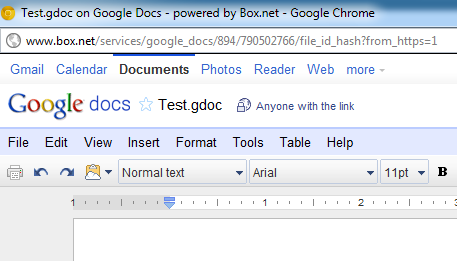
Box.net Integrates with Google Docs: "Box.net, a popular online storage service, added an option that allows its users to create and edit documents and spreadsheets using Google Docs, but without leaving Box.net. The files are stored by Box.net, but they can be edited using the regular Google Docs interface.


'Beginning today, Box's 6 million users can easily create and collaborate on Google Docs and Spreadsheets from within Box, as well as edit the existing 50M+ Word and Excel files already stored on our platform. Google Docs enable entirely new forms of collaboration – like concurrent editing – that are impossible within desktop applications, and now these capabilities are easily available to Box users. We believe that the combination of Google Docs' collaborative editing and Box's content management will transform the way people work,' suggests Box's blog.

The integration has a lot of quirks: Google Docs still displays the navigational bar and some options that only makes sense for Google's services. When you edit a document from Box.net, the file is temporarily added to the Google Docs list, but it's quickly removed after the editing window is closed. At some point, Google Docs will also add support for third-party apps, so it will be interesting to see if this feature will be better implemented.

{ via Read Write Web }


"

How To Download All Videos From A YouTube Playlist

How To Download All Videos From A YouTube Playlist: "

youtube playlist downloaderA bit after I figured out that there is a wealth of programming tutorials on YouTube, I thought it might be a good idea to download them all so I can view them on the go on my mobile devices. Since the majority of these videos have been kindly organized into neat playlists, the question now seemed to be whether there is a way to download whole playlists. I certainly wasn’t the only one to ask this question. In fact, our readers have also wondered the same thing on the Answers community.

Today, we’ll go over two ways you can download entire playlists, one which should make Firefox users ecstatic, and another Windows program which presents some handy options for mass video downloaders.

BYTubeD – Bulk Youtube Video Downloader (Firefox Addon)

This Firefox 4-compatible add-on is a simple but fantastic little tool to help you find download links for multiple videos. Once you’re in a playlist page, you can right-click and select the BYTubeD option. youtube playlist downloader The button can also be invoked from any YouTube pages with multiple videos, such as search results from a keyword.
download youtube playlist
After you click on the BYTubeD link, a window will appear with the list of video links it has found. Now this is the part that confused me at first, because I didn’t quite read the instructions or the Help section. You have to select the videos you want to download by pressing Ctrl + A to select all videos or hold Ctrl while you click on the specific links you want.
download youtube playlistOnce you have a few neon green links, you can select the destination folder, whether you want the videos in FLV format or (MP4 if they’re available), and whether to generate links or enqueue videos for download.
If you chose Enqueue for Download and pressed Start, the default Firefox download manager will popup and show the current downloads.
download youtube playlist
Since I have DownThemAll, I chose Generate Links, so BYTubeD will create a new HTML file with links to the videos I selected so I can use DownThemAll on the current page. Generate Links should work for other download managers as well.
download youtube audio
I have found BYTubeD to work flawlessly. If you don’t use Firefox, you can still download multiple videos from a playlist with the following program.

DVDVideoSoft’s Free Youtube Download [Windows]

DVDVideoSoft has a variety of converter software, but the one we are interested in is the YouTube Download 3.0.1. When you’re installing the latest build, make sure to carefully choose what to install, because for older versions of other program files by DVDVideoSoft, there could be crapware offers sometimes.
youtubeplaylistdownloader
Once you have installed the YouTube Download program, you can paste in any video or playlist URL and choose the video quality and video format, such as MP3, FLV and 3GP.

For AVI, you have to click on Edit, which will bring up the preset editor.

One of the best parts about this downloader program is that you can preview the size of the individual videos and the playlist as a whole depending on the video format you choose. You can also select individual videos from a playlist that you want to download and which ones you want to skip.
youtube playlist downloader
The instructions for this program suggest that you can also use this program to download all of the videos from a channel as well.

For Linux users, youtube-dl is incredibly powerful and also supports playlist downloading. See this video for the how-to. Does anyone know if there’s a good YouTube playlist downloader for Mac?

Now, let’s hear from you. What do you use to download YouTube playlists? Enlighten us in the comments!

Image Credit: YouTube Playlist Downloader

How To Download All Videos From A YouTube Playlist is a post from: MakeUseOf

More articles about: , , , , , ,

Similar articles:


"

Lessons from 99 Weeks of TWiG

Lessons from 99 Weeks of TWiG: "

Tomorrow afternoon Leo, Jeff, and I will record the 100th episode of This Week in Google. 100 episodes! When we started the show almost two years ago, I had no idea it would be such an education in conversation, critical thinking, and performance.


I always try to play up, or work with people who are more skilled and experienced than I am. Leo and Jeff have not only been great co-hosts, friends, and heroes, they've been incredible mentors and teachers to me. Here are three lessons I've learned in the past 99 episodes of TWiG.


A live show is a better show.


When Leo says the words 'It's time for TWiG!' into that big microphone, it's on. We're live. There are no rehearsals, do-overs, or edits. It doesn't matter if you accidentally say 'blowjob', have whooping cough, or blurt out the phrase 'Facebook condom' without thinking. You laugh, go with it, and hopefully enjoy a few LOLs going by in IRC.


As a writer I rely heavily on editing, so I really had to learn to loosen up and surrender to the live format. Now that I'm comfortable with Jeff and Leo and the TWiT community, I see that a live show with a live audience is a better show. The audience eggs me on, makes me more willing to speak up, be goofy, make a strong point, float a half-baked idea, and react to comments in chat as they happen. That interaction makes the show more fun and better all around.


Say exactly what you have to say—no less, and no more. Don't overthink it.


The first dozen episodes or so of the show I held back a lot. Intimidated by the format and my august co-hosts, I was worried about not having something interesting or clever enough to say. I didn't join the chat room during showtime for fear it'd be a distraction and I'd lose track of what was going on. I'd spend the show reading and re-reading the news items we were discussing to make sure I knew every detail of every story. I was overthinking it.


Friends who listened to the show said they wish I spoke more. At a conference, I saw Jeff in person and I asked him how he thought the show was going.


'Speak up,' he told me. 'We don't hear from you enough.'


That's when I made a conscious decision to stop being timid and go for it. Now, I'm in the chat room every episode. I've gotten a whole lot more comfortable and vocal. At times, I've overcompensated, and rambled about something because I thought I should, not because I had something to say. I've gotten better in the past 99 weeks, but I'm still learning when to speak up and when to shut up.


The most interesting thing about tech isn't tips and tricks.


I'm the "tips" person on TWiG, charged with sharing a bit of advanced functionality or a cool new feature at the end of every episode. That's fun and familiar ground, something I've done at Lifehacker and beyond for years now. But it's the rest of the conversations that stretch my brain and make me think and grow—discussions about things like the cultural impact of the web and government/international policy around the internet. This is such a crucial time in history, and the topics we cover on TWiG are some of the most important conversations to have now. Jeff in particular has made me examine and re-examine my own views on privacy and publicness, and see where and how often the media and even my own community of technologists get the story wrong. (You gotta respect a guy who walks the talk by being so public about his own private parts.)


Every Wednesday afternoon, a couple thousand people show up at live.twit.tv to watch Leo, Jeff, me, and our guests discuss news about Google and the web in general. We in turn watch them chat in IRC as we go. Then, another 65,000 people download the audio and video recordings after the fact. A surprising number of those listeners send us passionate email agreeing, disagreeing, questioning, and correcting points made in those conversations, sometimes days and weeks later.


All of these conversations have been an incredible privilege to have.


I learn by doing, and TWiG has been the best media training anyone could ever hope to get. Thanks to Leo and Jeff and all our listeners and viewers and chatters for a fantastic first 99 episodes. Here's to our next 100.


"

How Stuff Works: Fiber Optic Cables [Science]

How Stuff Works: Fiber Optic Cables [Science]: "

Most people are familiar with the general concept of fiber optic cables–light as a method of data transmission–but how do they really work? Find out in this informative video.


Bill Hammack, of Engineer Guy Videos, shows us how fiber optic cables work using–of all things–a bucket and a laser. Check out the above video for a glimpse inside how fiber optic cables work and how your analog voice can go to from your phone’s handset to a digital stream and then back to analog sound for the benefit of your friend on the end of the fiber optic transmission cable.


Fiber Optic Cables: How They Work and How Engineers Use Them to Send Messages [YouTube]


What is a Histogram, and How Can I Use it to Improve My Photos?How To Easily Access Your Home Network From Anywhere With DDNSHow To Recover After Your Email Password Is Compromised


"

Google Making Open Source Push to Be Leader in Real-Time Communications

Google Making Open Source Push to Be Leader in Real-Time Communications: "

Google_WebRTC_150x150.jpgGoogle is making a push to be the de facto leader in real-time communications on the Web. The search giant hopes that by developing a new open source Web standard for video and audio communications it can be on the forefront of the next generation of Internet networking.


Google is doing this through a program called WebRTC, a project that was spawned from the company's acquisition of Global IP Positions (GIPS) in May 2010. Google is now ready to begin implementing WebRTC into its Chrome browser. It will augment its current video chat capabilities within Gmail and put a dent into real-time, unified communications aspirations of companies like Microsoft (Skype), Apple and Cisco.


Sponsor


Google's attack with WebRTC is two-pronged and fits precisely into its vision for the Internet. Foremost, Google wants to help define the Web standards of the next generation. By doing that, Google can shape how the Internet fundamentally functions and make sure that its search and application products are primary destinations for users. It is about innovation, but it is also about business.


Secondly, and on a more practical basis, Google's three biggest initiatives are in developing Web applications outside of the desktop (see Chrome OS), mobile functionality and the cloud. Those three are tightly intertwined in Google's vision. WebRTC fits within all three of those by creating system where people can connect through video or audio anywhere on the Web, on any device, through the browser, in the cloud.


WebRTC_Diagram.jpg


WebRTC makes this possible through Javascript APIs that are free and open source. Hence, not limited to Google. Mozilla and Opera have been invited to the initiative as well. The immediate goal is to collaborate with the open source community to create a universal set of Javascript APIs that enable real-time communication through the browser across the Web.


Google announced last week that WebRTC is about to land in Chromium, the code source for the Chrome browser.


'We are working hard to complete the remaining steps for a full integration in Chromium and Chrome including JavaScript APIs in WebKit and handling of the native audio and video capture and rendering,' Jan Linded wrote in a blog post at WebRTC.org. 'When we are done, any web developer shall be able to create RTC applications, like the Google Talk client in Gmail, without using any plugins but only WebRTC components that runs in the sandbox.'


Discuss


"

Minha lista de blogs