domingo, 2 de outubro de 2011

The 10 Greatest Empires In The History Of The World

The 10 Greatest Empires In The History Of The World:


Rashidun Caliphate

Throughout history much of the world has been ruled by empires.


To be considered an empire an expanse of land must be politically led by either a monarch, an emperor, or be an oligarchy.


As the decline of the U.S. is being hailed in the news and opinion of the world, we thought it would be interesting to look at the biggest empires of the past.


Aside from their leadership model, the only other thing they all have in common is that each of them disappeared.

10) The Rashidun Caliphate continued Muhammad's legacy


The Rashidun Caliphate covered over 3 million square miles of land - almost 6% of the earth's land-mass.


This empire began when Mohammad died in 632 AD and his followers scrambled to acquire his empire while the great prophets family prepared for his funeral.


Despite being a Caliphate or religiously governed empire, the conquered of other faiths were given good treatment.


They were allowed freedom to practice their own religion as long as they paid taxes to the Caliph.


9) The Portuguese Empire outlasted everyone


The Portuguese Empire was the first global empire in history, as well as the longest-lived modern European colonial empires. 


The empire began with the capture of Ceuta in 1415 and ended in 1999 with the handover of Macau. The empire's most valuable colony, Brazil, won its independence in 1822. Following a war in 1974 to overthrow the regime, the empire's government recognized the independence of all its colonies, except for Macau. Macau was returned to China in 1999.


8) The Abbasid Caliphate eventually lost out to the Turks


The Abbasid Caliphate covered 4.29 million square miles of land - more than 7% of the earth's landmass.


The empire had an unknown population number in 750 and claimed Baghdad as its capital.


While population numbers are unknown, the empire lasted from 750 to 1258 and only went into decline as the Turkish army rose to power.


See the rest of the story at Business Insider

Please follow Business Insider on Twitter and Facebook.

See Also:


Product Development: 9 Steps for Creative Problem Solving [INFOGRAPHIC]

Product Development: 9 Steps for Creative Problem Solving [INFOGRAPHIC]:

Ronald Brown is a successful startup CEO with an extensive background in technology and consumer marketing. His new book, Anticipate. The Architecture of Small Team Innovation and Product Success is available via iTunes, Amazon, Barnes & Noble, and Kobo.


Creativity is the main prerequisite for innovation. However, our culture emphasizes critical thinking to the near exclusion of creative thinking (although it was the key to success in the Information Age). Today’s business is dominated by global complexity and commoditization. On the other hand, experts believe that creativity will be the driving force behind business success in the coming decades.


What constitutes creative thinking? For one, learning to think expansively and visually — to see patterns and “connect dots.” You also need to let your subconscious mind do a bulk of the work by temporarily disengaging your logical mind — in other words, Einstein’s process of mental incubation. And, once you have an idea, it’s important to be able to communicate it clearly and accurately to others.


In business, the process of generating and commercializing a good idea has been honed by creative industries for more than a hundred years. This infographic presents nine major steps toward creative problem solving for new product development.


More About: Business, contributor, features, infographics

For more Business coverage:


sábado, 1 de outubro de 2011

Timeline: Celebrating 40 Years at Walt Disney World

Timeline: Celebrating 40 Years at Walt Disney World:

With the 40th anniversary of Walt Disney World taking place this Saturday, we really had to think hard about what to feature on the blog in the days leading up to this huge milestone. After all, four decades of history sure offers a lot of options!


In the end, we wanted to honor as many milestones as we could. What resulted was the infographic below.


What do you think? What’s been a Walt Disney World highlight moment for you?


Timeline: Celebrating 40 Years at Walt Disney World


Timeline: Celebrating 40 Years at Walt Disney World by Jennifer Fickley-Baker: Originally posted on the Disney Parks Blog

Top 10 Tech Concepts You Always Wanted To Learn About (But Never Did) [Lifehacker Top 10]

Top 10 Tech Concepts You Always Wanted To Learn About (But Never Did) [Lifehacker Top 10]:

Top 10 Tech Concepts You Always Wanted To Learn About (But Never Did)We're busy people, and even the most savvy of us sometimes just don't have the time to learn about every odd and end in the tech world. Here are some of our favorite tech explainers on things you probably hear a lot about, but never really knew.


10. Net Neutrality


Top 10 Tech Concepts You Always Wanted To Learn About (But Never Did)It's a subject that only crops up from time to time—usually when new legislation is being pushed through or a tech company has done something really stupid—but it's an important thing to know about in today's age of ubiquitous internet. If you still aren't sure what net neutrality is—or even if you have a rough idea but aren't an expert—check out our introduction to net neutrality and what it means for you.


9. The Windows Registry


Top 10 Tech Concepts You Always Wanted To Learn About (But Never Did)Many Windows users know of the fabled registry, though fear it because of its cryptic (and powerful) nature. However, for those that understand how it works, it can be an invaluable tool. Check out our explainer and mythbuster on the Windows registry, and then be sure to check out our top 10 favorite registry tweaks to really make it work for you.


8. Android Task Killers


Top 10 Tech Concepts You Always Wanted To Learn About (But Never Did)Android task killers were useful tools back in the very early days of Android, but nowadays they actually do more harm than good—yet cellphone manufacturers still recommend them to new users all the time. Read up on what Android task killers actually do, and why you shouldn't use them on your phone. You might be surprised at what you find. Android isn't perfect, but traditional Task Killers aren't the answer (though we list some alternative tools that will help you in that explainer).


7. SSL Encryption (Also Known as HTTPS)


Top 10 Tech Concepts You Always Wanted To Learn About (But Never Did)You've probably noticed that some sites use https:// instead of http:// in their web addresses, but maybe you don't know what that actually means. Maybe you know that it encrypts your data for better security, but you don't really know what it's protecting your from. Either way, read up on what HTTPS is and why you should care about it on sites like Facebook, and once you do, be sure to check out browser extensions like HTTPS everywhere to get it enabled on as many sites as possible.


6. What "4G" Really Means


Top 10 Tech Concepts You Always Wanted To Learn About (But Never Did)This new "4G" phenomenon that's sweeping the nation is full of hype, but not very much real info. No one really says what 4G is or how fast it actually is—they just tell you it's something you want. We've talked about everything you need to know about 4G, including whether it's worth upgrading your phone for. Even if you thought you understood the basics behind 4G, you might be surprised at what you find.


5. The Difference Between Lossless and Lossy Music


Top 10 Tech Concepts You Always Wanted To Learn About (But Never Did)You may or may not think a lot about the "bitrate" of your music, but the argument of whether bitrate actually matters has raged for quite a while. We break down exactly what bitrate means, how lossless music compares to "lossy" music, and whether it's something you should worry about. If you decide lossless music might be for you, you might also want to check out our guide to managing multiple music libraries, which can be a great help to those with both high- and low-bitrate files.


4. 64-Bit vs. 32-Bit Operating Systems


Top 10 Tech Concepts You Always Wanted To Learn About (But Never Did)If you've reinstalled Windows or Linux anytime recently, you were likely given the option to choose between 64-bit and 32-bit versions. In a nutshell, if you have 4GB of RAM or more, you'll want to go 64-bit—but if you want to know why this is the case, check out our guide to 64-bit vs. 32-bit operating systems. And, if you aren't sure whether you even need more than 4GB of RAM, we've got you covered with an answer there too.


3. Proper Windows Maintenance


Top 10 Tech Concepts You Always Wanted To Learn About (But Never Did)Windows maintenance myths have been around since what seems like the beginning of time, which can leave you very confused as to what you actually need to do to your computer to keep it running in tip top shape. We've mentioned a few of the most important maintenance tasks you should perform, as well as some of the myths that might seem good, but can actually slow you down. Peruse our Hive Five on the best all-in-one Windows tools, while you're at it. When you're done reading, you should know enough that you'll never have to reinstall Windows from scratch ever again.


2. Viruses, Trojans, Worms, and Other Malware


Top 10 Tech Concepts You Always Wanted To Learn About (But Never Did)Windows malware: it's a burden many Windows users have to shoulder, yet something most of them know nothing at all about. If that sounds like you (or someone you know), we recommend learning the difference between viruses, trojans, worms, and other malware to get a better idea of what you're up against. You'll also want to check out these nine common myths and misconceptions about viruses, and then get yourself some good antivirus protection (which you shouldn't need to pay for since Microsoft's tools are good enough).


1. Wi-Fi and Networking


Top 10 Tech Concepts You Always Wanted To Learn About (But Never Did)With the internet as ubiquitous as it is today, networking is an essential part of any computer user's setup, yet so many of us are completely lost when we actually have to configure the networks in our home. We've gone through everything you need to know about routers, Wi-Fi performance, and making the most our of your network in our "Know Your Network" night school, so you'll never be puzzled by that router configuration page ever again. While you're at it, you might want to check out the many things that can lead to bad Wi-Fi coverage and how to fix them—you'll be glad you did.


There are a lot of complicated tech subjects out there, but these are some of our favorites from over the years that we think more people should know about. You probably have your own opinions, so if you can think of a good explainer we didn't mention above, share it with us in the comments.


You can contact Whitson Gordon, the author of this post, at whitson@lifehacker.com. You can also find him on Twitter, Facebook, and lurking around our #tips page.


How We Built Our Real-Time, Location-Based Urban Geofencing Game

How We Built Our Real-Time, Location-Based Urban Geofencing Game:

This guest post comes from Amber Case, co-founder of Geoloqi, a private, real-time platform for location sharing. She also speaks frequently on Cyborg Anthropology, the study of humans and computers.


GeoloqiIn this post I’ll describe how we planned, built and tested a truly real-time location-based game with Socket.io, Redis, Node.js, and what we learned along the way. Over the past few months, we’ve spent the majority our free time building a real-time game as a test for our location platform, Geoloqi. We call the game MapAttack! due to its map-based nature. Two teams compete to capture the most points on the gameboard. The gameboard, in this case, is the city streets of the neighborhood the players are in.
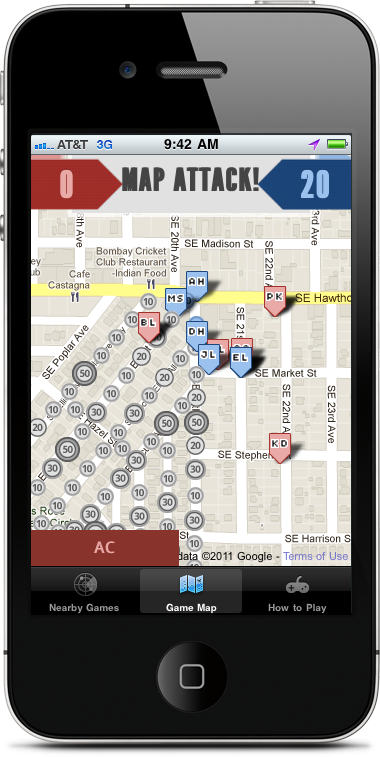

MapAttack iPhone Gameboard


We set each geofence up with a point value that would give players points for entering geofences. The idea was that a virtual map would be set up on top of the real world, and players on red and blue teams would try to capture all of the geofence points in the game before the other team. To capture a point, the phone would have to detect when the player entered the fence, determine the point value of the fence, notify the player that he received the point, turn the geofence the color of the team, and then add the point to the player score and the overall team score.


Why Build a Real-Time Geofencing Game?


We wanted to create a game that allowed people to physically interact with the real world instead of a computer console like a first person shooter or a real-time strategy game. We were inspired by playing a real-life version of Pac-Man called Pacmanhattan, invented by graduate students at the Interactive Telecommunications Program at NYU in 2004. We played it at Portland’s WhereCamp conference in 2008, and we wanted to see if we could make a GPS version of the game, as Pacmanhattan relied entirely on phone calls and physical maps. We also needed a good demo of Geoloqi’s streaming API.


Technical Challenges


Here is an overview of the problems we had to focus on in order to build the game.


  • Handling the detection of users entering and leaving 200+ geofences concurrently.

  • Handling the volume of location-updates from all the phones in a given game (20 or more users per game).

  • Allowing each phone and web browser watching the game to be able to see the movements of players and the geofences changing color in real time. Every phone in the game sends its location to the server, which broadcasts that data to every other phone and browser watching the game.

  • Handling errors and differences in GPS technology on different smart phone models in order to ensure a fair gameplay experience.


Differences in GPS Hardware


GPS signals are known for reflecting off of tall buildings in urban settings. This causes inaccuracy and inconsistency in location data. It is less-pronounced in newer phones, but it greatly shows in older ones.
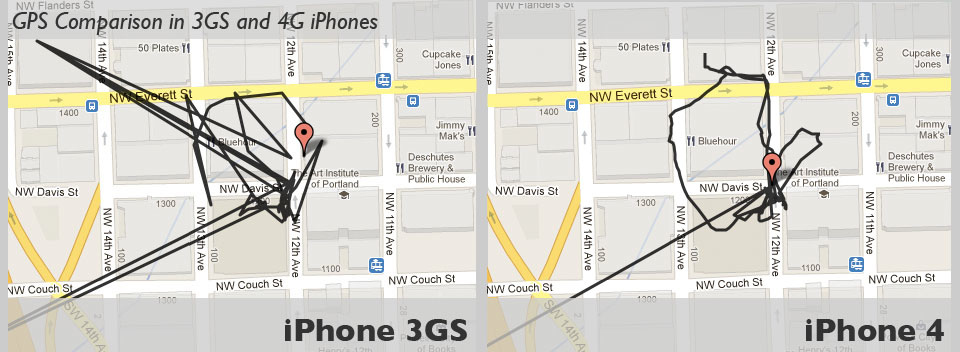
Comparison of iPhone 3GS and iPhone 4 GPS quality


Before our Streaming API


Before we finished the Geoloqi streaming API and before we started using Node.js and Socket.io, everything was based on polling for new updates. Phones reported their location at 5 second intervals and the browsers would update the game board in 5 second intervals.


Using Socket.io, Node.js, Redis, and Sinatra Synchrony
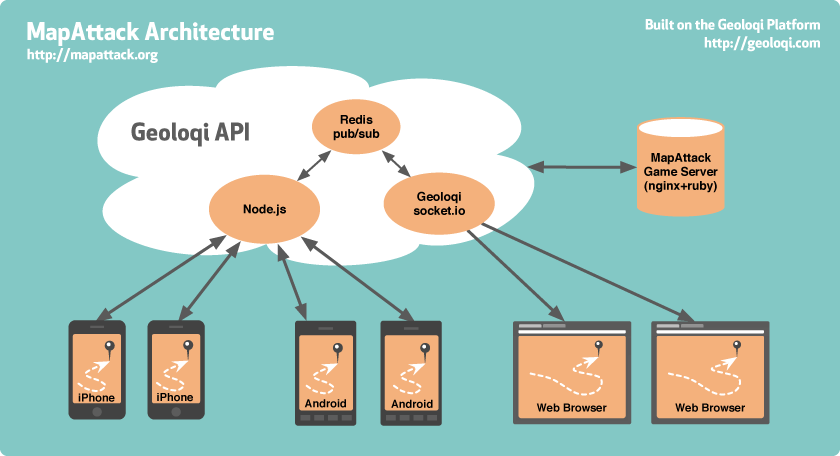

MapAttack Phone/Server Architecture


Socket.io


Socket.io is a cross-browser web socket implementation allowing us to do real-time data updates on the browser and also supports older browsers. We can use the latest technology without requiring all of our users to update to the newest browsers, thanks to Socket.io falling back to older technologies in older browsers. This allow us to do instant updates across browsers and the phones in the game.


Node.js



Node.js is Evented I/O for V8 Google’s Javascript implementation for Chrome, implemented with a reactor pattern, that enables for large amounts of asynchronous data traffic.


We use a Node.js server to stream the location data from the phones to the Redis pub/sub channel. It publishes to Redis, and another Node server subscribes to that redis channel. Our Node.js server receives updates from the phones using a custom protocol similar to Google’s Protocol Buffers, which is essentially a very compact binary JSON.


When a browser wants to start streaming data, it connects to the Socket.io server and that server then subscribes to the Redis pub/sub channel. The Socket.io server sends that data via Websockets to the browser, falling back to Flash or long-polling if Websockets is not available.


In essence, Socket.io allows us to use Websockets, which are completely new, but also allows this to work on older browsers thanks to the fallback tricks.


Redis



Redis is an open source, advanced key-value store that has support for message queues using something called publish/subscribe, or pub/sub (not to be confused with PubSubHubbub).


From the higher level what this lets us do is handle the difficulty of sending data to all of the phones in the game and the browser in real-time. Every phone in the game sends its location to the server, which broadcasts that data to every other phone and browser watching the game.


One of the interesting things about the publish/subscribe system is that with a traditional system you have to maintain connections and iterate through each in order to pass data through them. The alternative would be that if you had 10,000 users you’d have to iterate through an array of 10,000 connections, which would be very slow and prone to locking up on socket problems.


Using Redis pub/sub is like starting a radio station. Once it is turned on, people (in this case, browsers) can just listen in. This allows us to do real-time data updates to clients (browsers and phones) at a massive scale.


Sinatra Synchrony



Sinatra::Synchrony is a small extension for Sinatra that dramatically improves the concurrency of Sinatra web applications. Powered by EventMachine and EM-Synchrony, it increases the number of clients your application can serve per process when you have a lot of traffic and slow IO calls (like HTTP calls to external APIs). Because it uses Fibers internally to handle blocking IO, no callback gymnastics are required! This means we can just develop as if we were writing a normal Sinatra web application.


Sinatra::Synchrony allows us to do asynchronous programming (ala Node.js), except that it wraps the callbacks in Fibers (which are basically co-routines in Ruby). This allows you to do synchronous programming while taking advantage of asynchronous code. Aside from being easier to program this way, it also allows us to switch to a different concurrency/parallelism strategy if we need to. Kyle Drake developed Sinatra Synchrony specifically for MapAttack. Drake’s work became popular after he made a presentation on Sinatra::Synchrony at PDX Ruby.


The MapAttack Game Server


Finally, there is the MapAttack Game Server. In this case the Game Server is a simple database that takes care of storing the player point data that is displayed on the map and on the phones as players grab points in real-time.


Source Code


We made the source code for MapAttack available for download. You can download or fork the source code for the MapAttack website, iPhone application and Android application. If you build anything interesting with it, please let us know.


Upcoming Games


We’ll be bringing MapAttack! to WhereCamp Portland on October 7-9, 2011. We’ll give an overview of the technology there as well. If you plan to be in the area, please join us.


Sponsored by

Related ProgrammableWeb Resources

Geoloqi Geoloqi API Profile, 2 mashups


Minha lista de blogs